AdaptaFit: Workout & Nutrition

The plan that adapts. The calories that follow.

A gym plan built around your equipment, schedule and goals that adapts as things change. The lifting you log becomes energy in today’s calorie target.

Download on the App Store

First month free. Then $14.99 a month or $99.99 a year.

iPhone, iOS 26.4 or laterRuns on iPadApple Watch companion

See how it adapts
Video: AdaptaFit on iPhone, logging a bench press set, rating it with one rep left, and the rest timer adding 15 seconds for a hard set.
  • 382exercises, most with demo videos
  • 4apps you can import your history from
  • 1 monthfree when you first subscribe
  • 0accounts to create. Your history stays on your phone

One loop, not two apps

Training and nutrition, finally talking to each other.

  1. You lift.

    Workout calories come from what you actually did: sets, load and effort, plus heart rate when you wear an Apple Watch.

  2. Today’s target moves.

    Your calorie target follows the training you logged today. Steps from Apple Health count toward it too.

  3. Your maintenance gets measured.

    After about a month of logging and weigh-ins, your maintenance comes from your scale and your food log, not a formula.


How the plan adapts

A plan for the week you actually have.

01 Built around you

Starts from your real setup.

Tell it your goals and experience, the equipment you have at home, at the gym or on the road, the days you lift and how long each one can run. Add injuries or limits, and the muscles you want to bring up.

  • 382 exercises, most with demo videos
  • Multi-week plans that build to a deload
  • Your rules, held every week: “machines only for legs”, “no supersets”

Screenshot: the AdaptaFit calendar for a month, with completed upper and lower days, rest days, two missed days, today, and upcoming sessions, and a Travel Mode button.
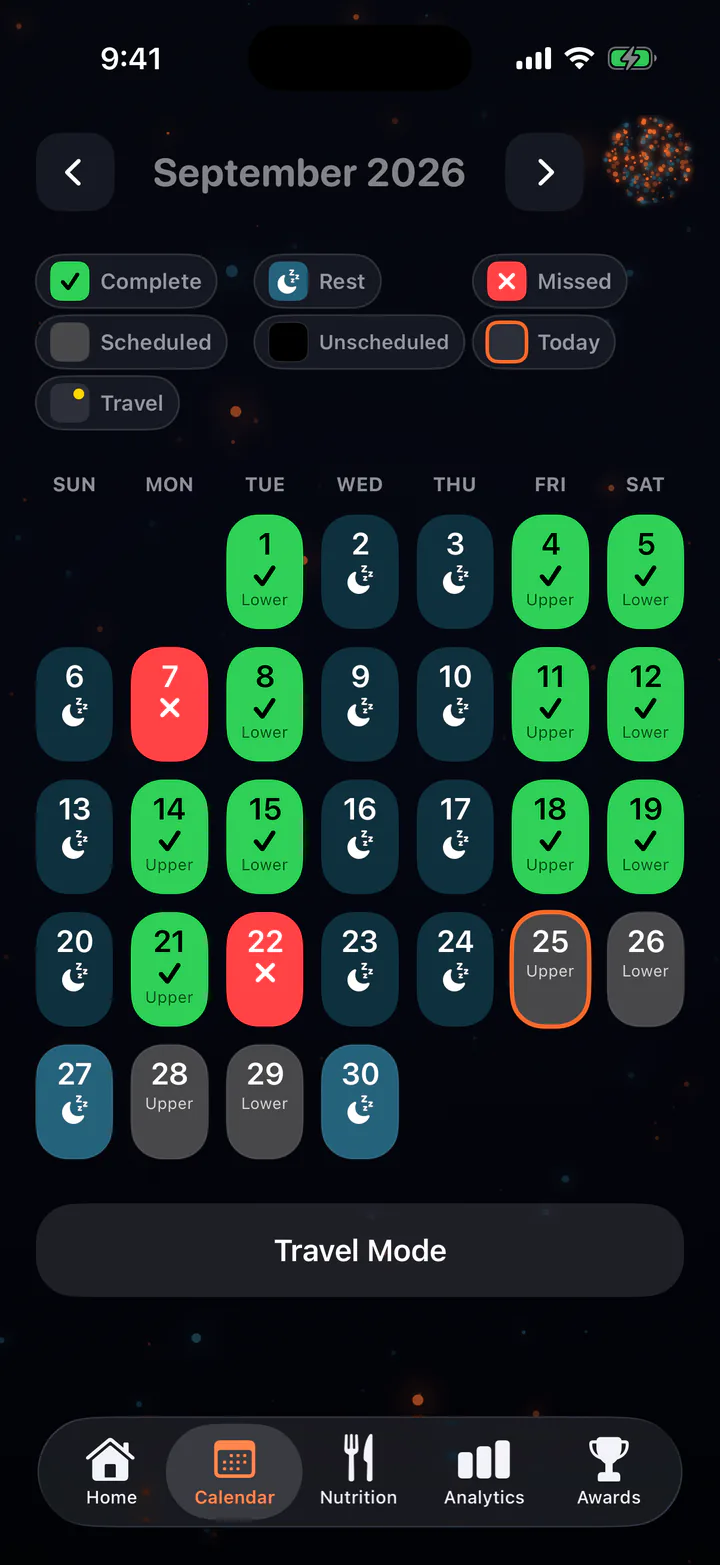
The AdaptaFit calendar for a month: completed upper and lower days, rest days, two missed days, today, and upcoming sessions, with a Travel Mode button.

02 Real life

Short on time. Different gym. Missed a day.

Today is sized to the time you set for it, and can be rebuilt for the time you have. “Different setup today?” swaps in exercises for the equipment in front of you, and travel mode covers the road.

Miss a day and the plan carries on by date. Nothing to reshuffle.

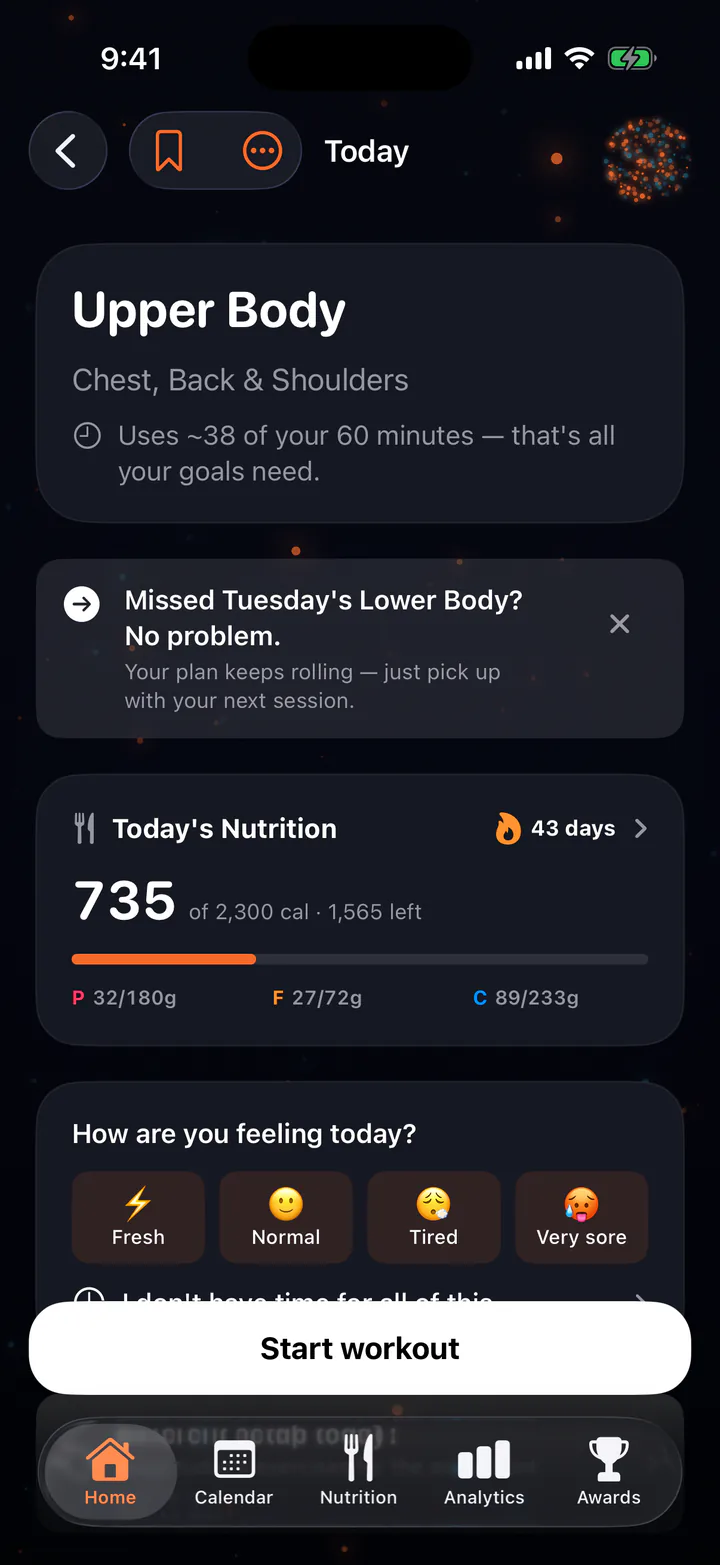
  • “Uses ~38 of your 60 minutes”
  • Home, gym and travel setups

Screenshot: today’s Upper Body workout, which uses about 38 of your 60 minutes, with a banner that reads “Missed Tuesday’s Lower Body? No problem.”

Today's Upper Body workout: uses about 38 of your 60 minutes. A banner reads: Missed Tuesday's Lower Body? No problem.

03 The coach

Tell the coach. The plan changes too.

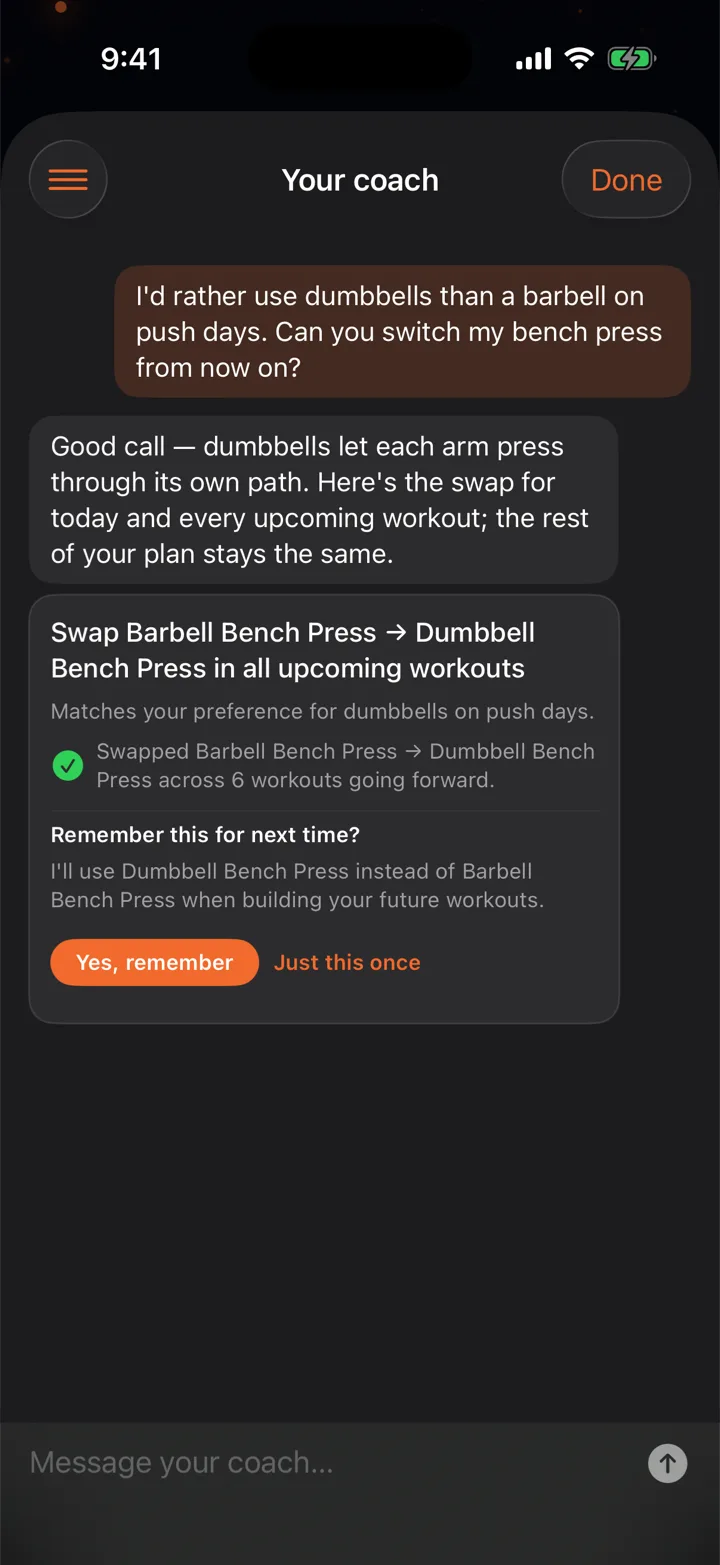
Ask from any tab, or mid-workout. Suggestions arrive as Apply cards: one tap to swap an exercise everywhere, move a day, or fit today into the time you have. Nothing in your plan changes until you tap Apply, every change has Undo, and a lasting swap is remembered when your next plan is built.

“I’d rather use dumbbells than a barbell on push days.”

Swapped Barbell Bench Press for Dumbbell Bench Press across 6 workouts going forward.

Video: the coach proposes swapping barbell for dumbbell bench press in all upcoming workouts. Tapping Apply updates six workouts, and Today now opens with Dumbbell Bench Press.

Video: the coach proposes swapping barbell for dumbbell bench press in all upcoming workouts. Tapping Apply updates six workouts, and Today now opens with Dumbbell Bench Press.

04 Logging

Logging that reacts to effort.

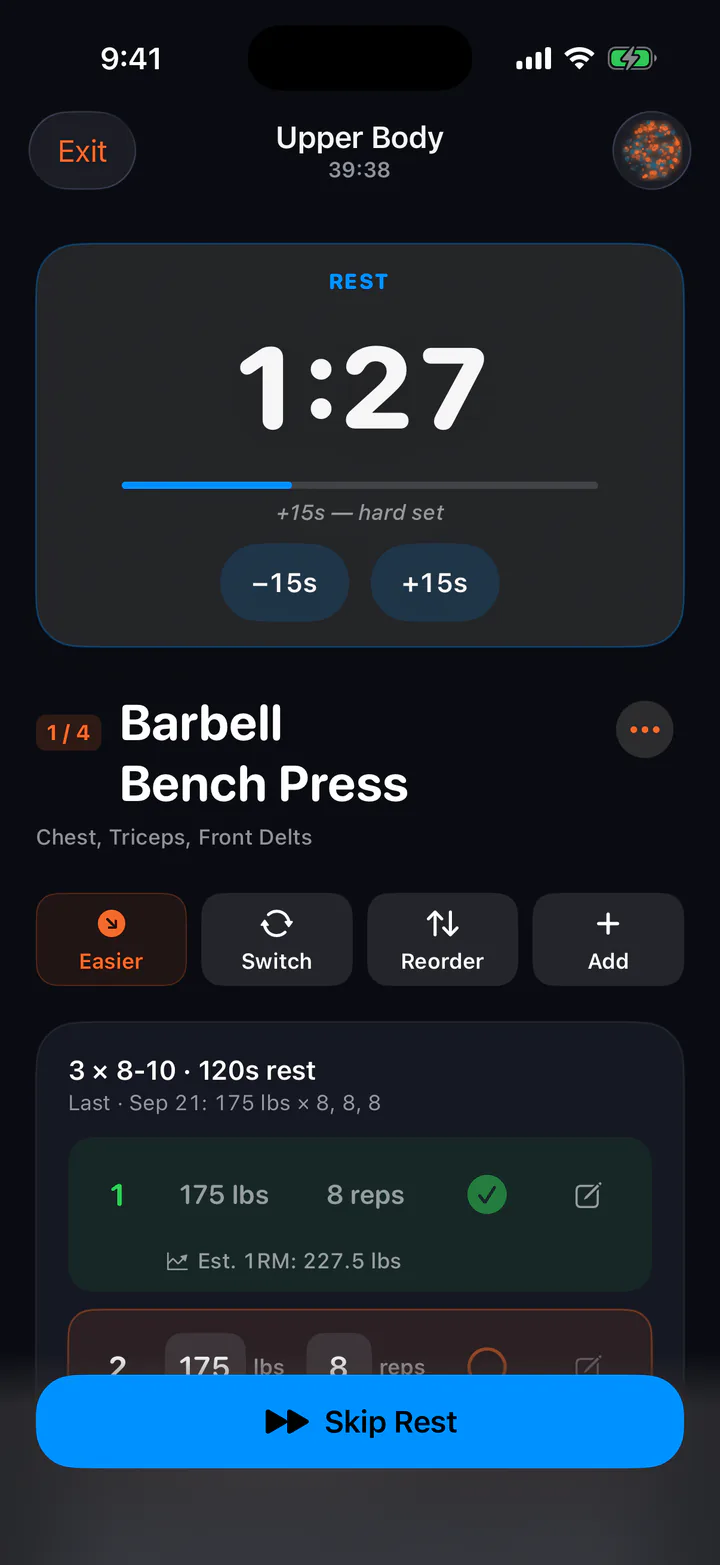
Weights prefill from last time, with a warm-up ramp, plate math and a live one-rep-max estimate. After each set, rate the reps you had left. A hard set earns more rest, “+15s — hard set”, and your ratings help tune your next weights.

The effort prompt: How many more reps could you do? Options 4 or more, 3, 2, 1 and 0, from Too Easy to Max Effort.
After every set: how many more reps could you do?
  • Add, swap or reorder mid-workout
  • Supersets and set types
  • “+5 lb” nudges
  • Shareable session cards

Screenshot: a logged bench press set of 175 pounds for 8 reps with an estimated one-rep max of 227.5 pounds. The rest timer reads 1:27 with the note “+15s — hard set”.

A logged bench press set of 175 pounds for 8 reps with an estimated one-rep max of 227.5 pounds. The rest timer reads 1:27 with the note: plus 15 seconds, hard set.

Nutrition

Calories that follow your training.

Log food by search, barcode, a photo of the label or a photo of the meal. Your target for the day already includes the training you did.

  • Search
  • Barcode
  • Label photo
  • Meal photo

Workout calories, computed from what you did.

The energy from a session is worked out from the lifting you logged, and added to today’s target. Steps from Apple Health feed your target too.

  1. Setswhat you did
  2. Loadhow heavy
  3. Effortreps you had left
  4. Heart ratewith Apple Watch

An empty day isn’t a zero.

A day with nothing logged counts as not logged, not as eating nothing. Fasting on purpose? Mark it with “I fasted this day.”

The Energy sweet spot card: Sweet spot, about 578 calories of deficit. A graph shows fat and muscle change per week across intake levels, with bands for surplus, sweet spot, costly and past ceiling, and a dot for where today is projected.

The energy sweet spot.

How much fat you lose, and how much muscle you keep, at your intake. A band marks the sweet spot for your goal, and a dot shows where today is headed. A bigger deficit isn’t a better one: past the sweet spot, muscle starts paying for it.

Measured maintenance

Maintenance, measured from your scale.

Formulas guess what you burn. AdaptaFit compares your weight trend with what you log, and measures it. That takes about a month of data:

28days of history
18weigh-ins
80%of days with food logged

Until then, your target starts from an estimate. Imported food and weigh-ins can count toward the month.

Four weeks of weigh-ins

Weight, lb

Day 1: 182.9 lb Day 2: 181.8 lb Day 3: 182.9 lb Day 5: 181.6 lb Day 7: 182.2 lb Day 8: 182.7 lb Day 10: 181.2 lb Day 11: 180.8 lb Day 12: 182.0 lb Day 15: 182.0 lb Day 16: 180.7 lb Day 18: 181.5 lb Day 19: 180.4 lb Day 22: 181.7 lb Day 23: 180.7 lb Day 25: 181.3 lb Day 26: 180.3 lb Day 28: 180.8 lb
Average logged
2,300 cal/day
Weight trend
−1.6 lb in 4 weeks
Measured maintenance
≈ 2,500 cal/day
An illustration with round numbers. A 1.6 lb drop over four weeks means about 200 calories a day more out than in, so 2,300 logged works out to about 2,500 burned.

Progress

Progress you can see.

Every session adds up. See it by week, month or all time.

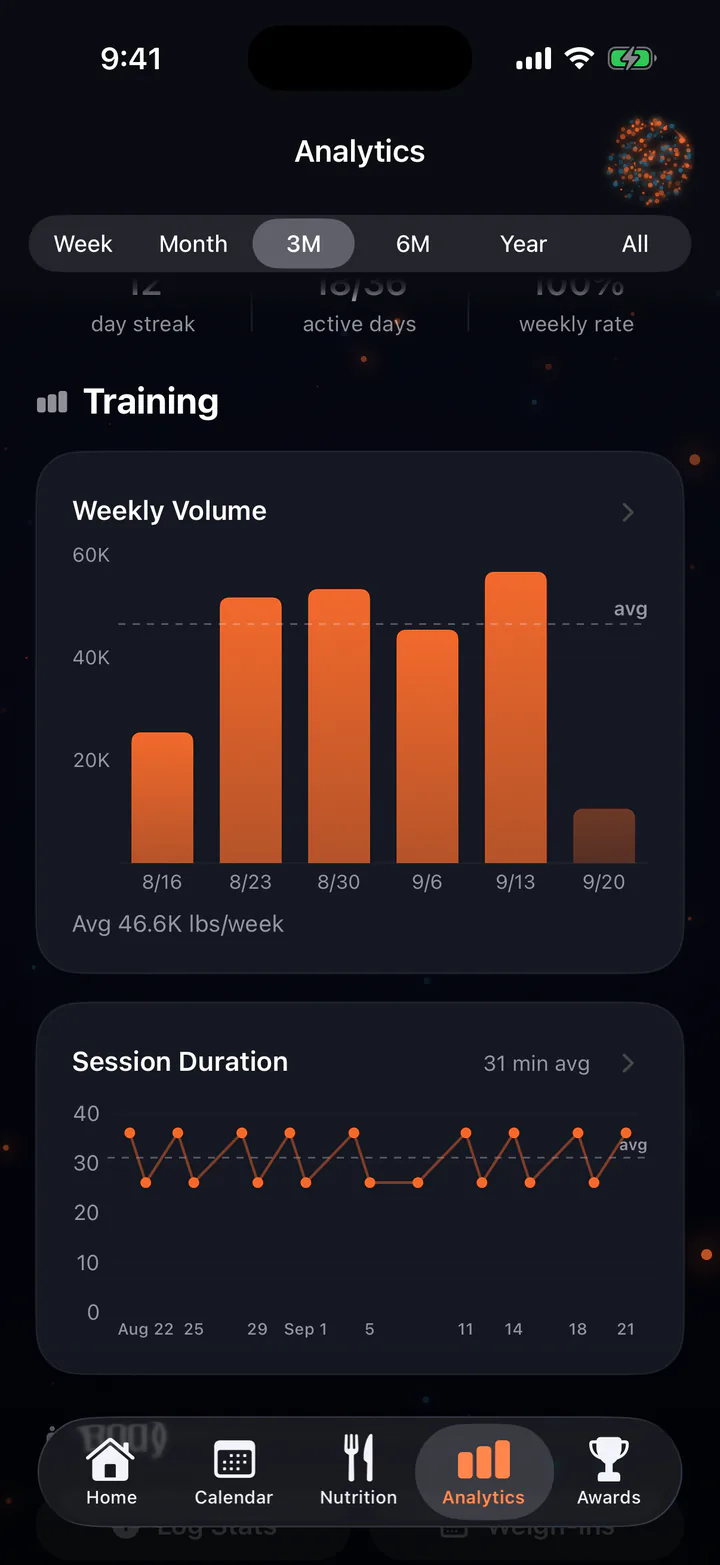
  • Workouts and volumeSessions and total weight lifted
  • Personal recordsNew PRs as they happen
  • ConsistencyA heatmap of done, partial and missed
  • Weekly volumeAgainst your own average
  • Session durationHow long training really takes
  • CalendarDone, missed and upcoming days
Video: Analytics, showing a month of 11 workouts and 157 thousand pounds lifted, then three months of 18 workouts, scrolling to the consistency heatmap and weekly volume.

Your data

Yours on the way in. Yours on the way out.

Your history stays on your iPhone.

There’s no account to create and nothing to sign in to. Your diary, workouts and history live on your device. Back up to your own iCloud with a tap, and restore on a new phone with “Recover my data.” A backup is a snapshot you take, not a live sync.

Plan requests, coach messages, food lookups and the photos you choose to analyze are sent to our servers to be processed. See the Privacy Policy.

  • No accountOpen it and start
  • On deviceHistory lives on your phone
  • Your iCloudBackups when you choose

Bring your history.

Import every set, rep and weigh-in: export from your old app, then choose the file in AdaptaFit’s Import history. You see a preview first, and one tap undoes it. Imported food and weigh-ins can count toward measured maintenance.

StrongHevyStrongliftsMyFitnessPal

Take it with you.

Use Export My Data to save workouts, food, weight, measurements and wellness as CSV spreadsheets plus one JSON file. Anytime, even after you cancel.

.csv.json

Apple Watch

Log sets from your wrist.

The Apple Watch app works with AdaptaFit on your iPhone. Start the workout, log each set and follow your rest on your wrist while your iPhone runs the plan.

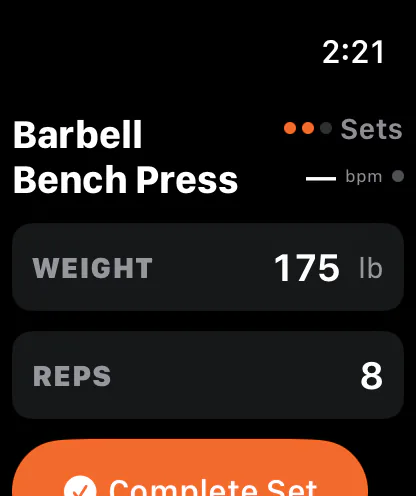
  • Apple Watch: Barbell Bench Press, weight 175 pounds, 8 reps, Complete Set.

    Log with the Digital Crown

    Start today’s workout, dial in weight and reps, then complete the set.

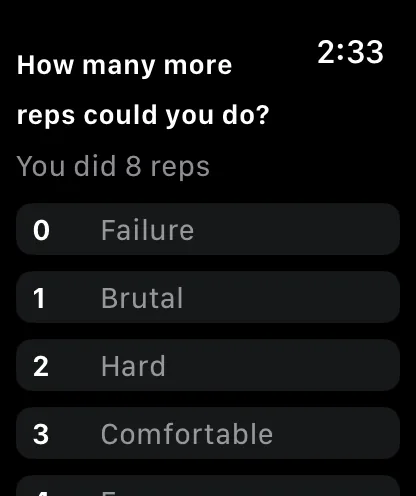
  • Apple Watch: How many more reps could you do? You did 8 reps. Options from 0, failure, to 3, comfortable.

    Rate the effort

    Answer “how many more reps?” on the wrist.

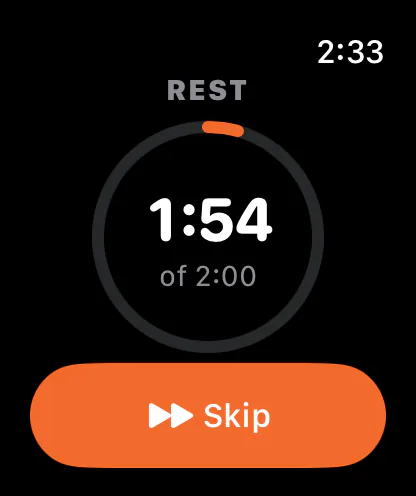
  • Apple Watch: Rest, 1:54 of 2:00, with a ring and a Skip button.

    Follow the rest ring

    See the rest timer count down, or skip it.

A companion, built for lifting. It works alongside your iPhone and doesn’t run on its own. Workout heart rate can feed workout calories. There’s no cardio mode: record runs and rides in Apple Fitness, and your steps and active energy come in through Apple Health.

Pricing

Start with a free month.

Your first month is free, then $14.99 a month or $99.99 a year. You pick a plan when you start, and you can cancel anytime.

Monthly

$14.99/ month

After your free month. Cancel anytime.

Yearly

Save 44%

$99.99/ year

About $8.33 a month, after your free month. Cancel anytime.

Every plan includes

  • Calorie targets that follow your training
  • A plan that adapts to soreness and travel
  • Tell the coach — your plan changes too
  • Food logging, plus an Apple Watch app
Download on the App Store

The free month is for new subscribers. After it, a subscription is needed to keep using AdaptaFit. US prices; local prices vary. Payment is charged to your Apple ID. AdaptaFit Pro renews automatically unless you cancel at least 24 hours before the period ends; cancel anytime in Settings. Plan generations, coach messages and meal photos have daily and monthly limits.

FAQ

Questions, answered.

What do I need to use AdaptaFit?

An iPhone on iOS 26.4 or later. It also runs on iPad as an iPhone app (“Designed for iPad”). The Apple Watch app is optional.

Does the Apple Watch app work without my iPhone?

No. It’s a companion: you start today’s workout, log weight and reps with the Digital Crown, rate your effort and follow the rest timer, while your iPhone runs the plan.

It’s built for lifting, so there’s no cardio mode. Record runs and rides in Apple Fitness; your steps and active energy come in through Apple Health.

Do I need an account?

No. There’s no sign-up and no login. Your diary, workouts and history stay on your device, and you can back them up to your own iCloud from Settings. A backup is a snapshot taken when you tap it, not a live sync.

Plan requests, coach messages, food lookups and the photos you choose to analyze are sent to our servers to be processed.

Can I bring my data in, and take it out?

Yes. Import from Strong, Hevy, Stronglifts and MyFitnessPal: export from your old app, then choose the file in AdaptaFit’s Import history. You see a preview first, and one tap undoes the import.

Use Export My Data to save workouts, food, weight, measurements and wellness as CSV spreadsheets plus one JSON file, even after you cancel.

When does measured maintenance start?

It needs about a month: 28 days, 18 weigh-ins and 80% of days logged. Until then, your calorie target starts from an estimate. Imported food and weigh-ins can count toward it.

How do I cancel?

On your iPhone, open Settings, tap your name, then Subscriptions, then AdaptaFit. Cancel at least 24 hours before the period ends to avoid the next charge. Refunds are handled by Apple at reportaproblem.apple.com.

When the paid period ends, the app locks until you resubscribe. Your history stays on your phone, and Export My Data still works.

Is this medical advice?

No. AdaptaFit plans around the injuries and limits you tell it, but it isn’t medical advice. If something hurts, check with a professional.

How do I get help?

Train for the week you have.

Download AdaptaFit and start with a free month.

iPhone, iOS 26.4 or laterRuns on iPadApple Watch companion